


Operator / team lead
Is the approved work instruction available at this station?
Evidence: Document revision and direct observation
Plan · Execute · Follow through
Audera is layered process audit software for manufacturers: AI-assisted checklist creation, L1–L5 scheduling, mobile evidence capture and corrective-action follow-up — so multi-shift LPA programs run as a visible workflow instead of a spreadsheet chase.
Keep your focus on the audit program: plan the checks, record what happened and follow up with the people responsible.
LPA software helps teams organize recurring process checks across different levels of responsibility. It connects who should audit, what they check, the evidence they record and how findings are followed up.
New to LPAs? Start with the guide →Inside Audera
Explore the tools your team uses before, during and after an audit. Each feature opens a view of the work.
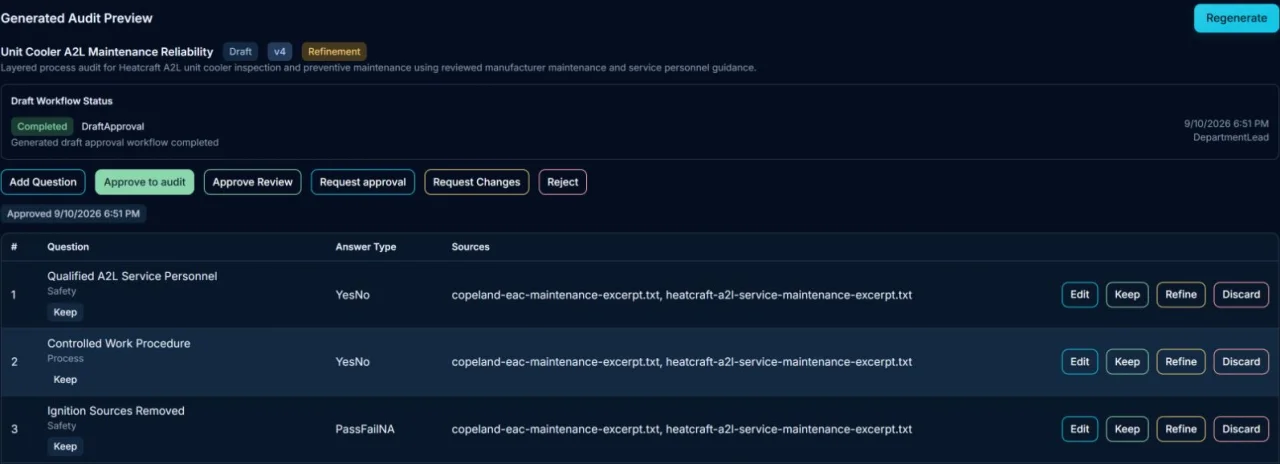
Turn process documents into draft questions. Review source references, refine the wording and record approval.
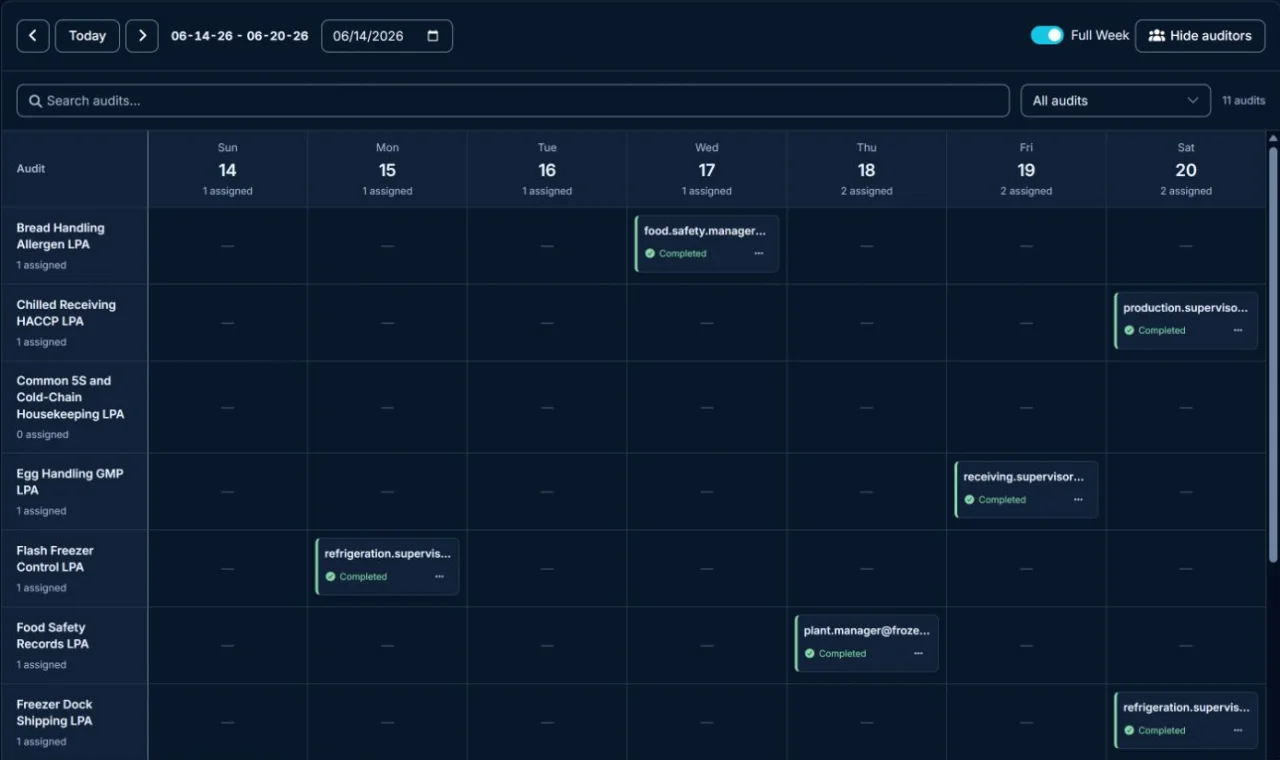
See draft reviewPlan recurring checks across shifts, locations and audit layers. See assignments and completion on the weekly board.
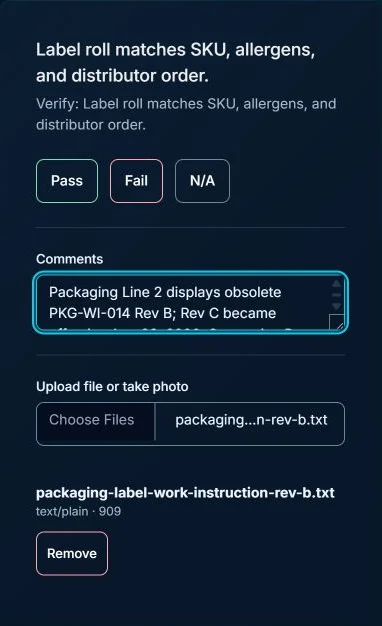
See the weekly schedulePick up assigned work, record what you find and keep observations and supporting files with the answer.
See an audit in progressKeep the failed check, responsible person and current status together so the next action is clear.
See the follow-up worklistSee where checks are being recorded across production areas. Bring the audit results into your team’s review.
See the location viewGive another location a familiar starting point. Preview the questions and structure before importing an existing audit.
See the import previewChoose audit levels and frequencies around your process risk, customer requirements and operating routine. The examples below illustrate responsibilities; they are not a prescribed schedule.
Operator / team lead
Evidence: Document revision and direct observation
Supervisor
Evidence: Schedule and recorded audit results
Quality / operations manager
Evidence: Failure history and open remediation items
Plant leadership
Evidence: Completion trends, missed coverage and aging findings
Start with a focused routine, then adjust coverage using completion data and the findings that recur.
See Audera in use
Follow the main steps below, or jump to the part of your audit routine you want to improve. These product screens use demonstration data.
01 / Build and review
Start with a template, your own questions, or an AI-assisted draft. Review the questions and their source references, refine the wording, and record approval before putting the audit into use.
02 / Schedule
Plan recurring checks across locations, shifts and audit layers. The weekly board brings assignments and completion status into one view so coordinators can see the work ahead.
03 / Record the check
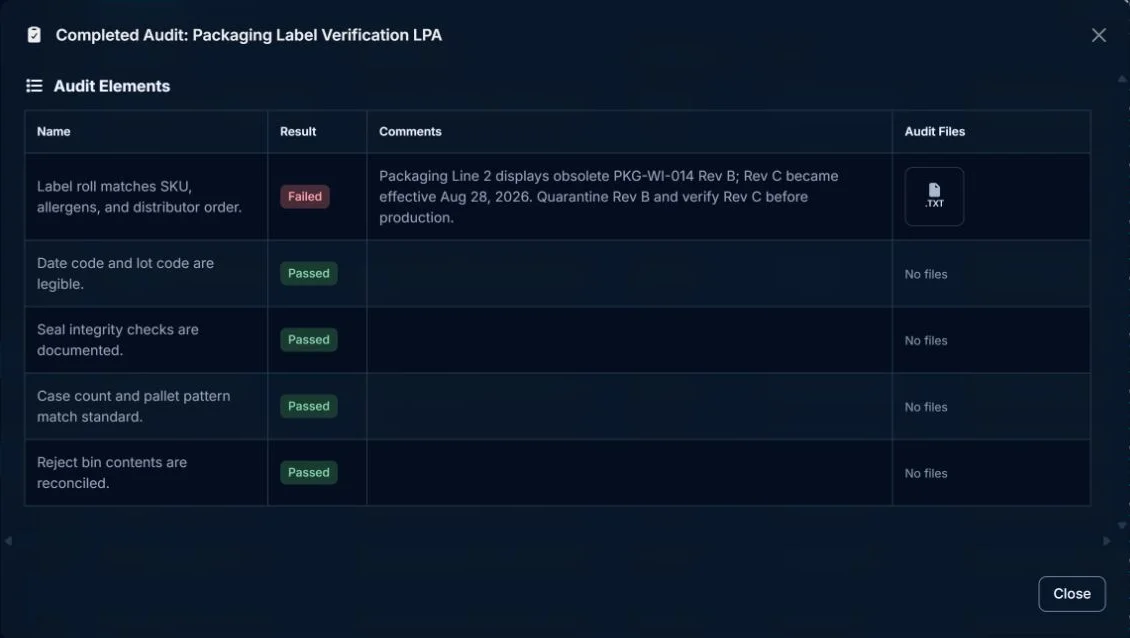
Auditors record a result, explain what they found and attach supporting evidence. The completed audit keeps that information together for the next person who needs to review it.
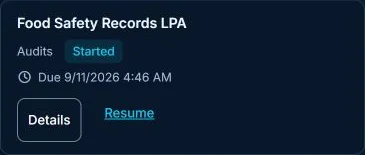
My Work shows the audit, its due date and the action to resume it.

04 / Follow up
See the failed check, its location, who it is assigned to and whether it is overdue. The worklist gives the responsible person a place to pick up the finding and record a correction.

Review the recorded answer and observation when deciding what needs to change. A completed audit and a resolved finding are separate parts of the routine.
Explore finding follow-up →Review where audits are taking place and reuse an existing audit when another location needs the same starting point.
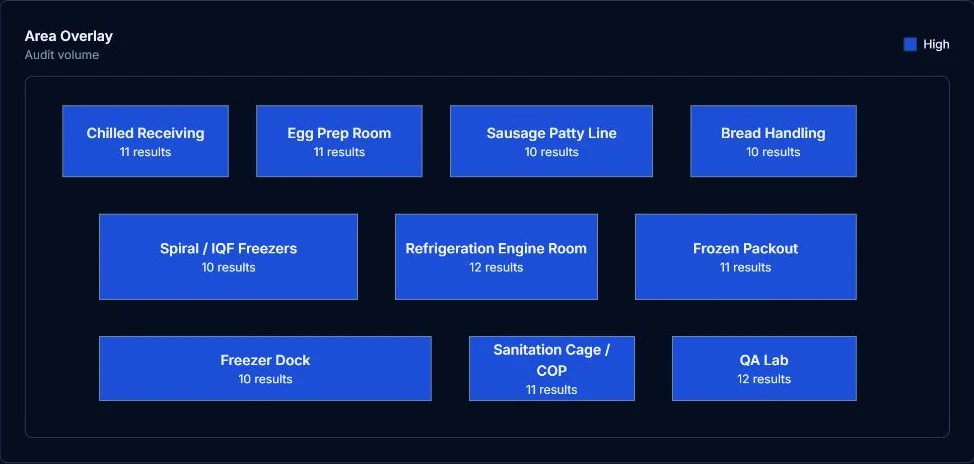
View audit-result counts across named production areas. Use the location view to discuss where checks are being recorded.
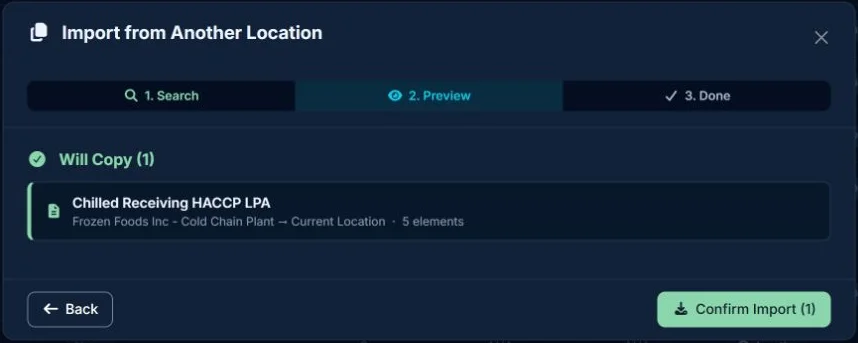
Choose an audit from another location and preview what will be copied before confirming the import.
Bring a checklist and walk through the routine with us.
Manufacturers need more than generic forms. Audera combines the layered process audit tools teams actually use — checklist setup, layered schedules, mobile execution, evidence, reporting, and corrective actions — for LPA programs and related shop-floor process checks.
Compare completion, missed checks, repeat findings and overdue actions across lines, shifts, departments and sites.
Move schedules, checklists, evidence and follow-up into one workflow supervisors and managers can use on the floor.
Role-based cadence, layer accountability and closed-loop actions that basic inspection forms usually lack.
Use the same execution pattern for process audits, safety or 5S checks, setup verification and line-clearance routines.
A useful pilot tests the whole routine: the checklist, the schedule, the evidence and the response to a finding. Expand when the team can run that routine consistently.
Agree timing and responsibilities with your team. There is no single rollout duration for every site.
Use the same tasks when evaluating any platform. Ask to see the workflow with a realistic example rather than relying on feature names. For a fuller evaluation plan, see the LPA software buyer's guide.
Can you set guidance, response types and the evidence required for each check?
Can you explain who gets assigned, which shifts are covered and what happens on non-working days?
Can an auditor read the question, record the result and attach evidence on the device they use?
Can a coordinator see unresolved findings, responsible contacts and escalation status?
Can you inspect completion, recurring failures and historical answers within the right location?
Which capabilities are included in the proposed edition and configuration? Confirm device and connectivity requirements.
Audera supports documented audit routines. Your team determines the applicable quality, safety and customer requirements; software does not certify a facility or guarantee compliance.
LPA software helps manufacturing teams schedule, execute, and track layered process audits across frontline, supervisory, management, and leadership roles. It replaces disconnected paper or spreadsheet routines with recurring schedules, mobile checks, evidence capture, corrective-action ownership, and reporting.
Manufacturers should look for L1-L5 scheduling, mobile shop-floor execution, evidence capture, corrective-action tracking, role-based accountability, reporting by line/shift/site, and an implementation path their teams can adopt.
Compare workflow fit, scheduling flexibility, mobile usability, corrective-action follow-through, reporting depth, rollout effort, user permissions, exports/integrations, and whether the platform supports layered accountability rather than one-off checklist completion.
LPA software can help automotive manufacturers run consistent layered process audit routines, document evidence, and follow up on findings. Compliance ownership remains with the manufacturer’s quality system; software should not be treated as a certification guarantee.
Generic checklist apps capture forms. Manufacturing LPA software adds recurring cadence, role-based accountability across L1–L5, evidence capture, reporting by shift or site, repeat-finding visibility and corrective-action follow-through.
Not usually. Generic audit tools often cover finance, compliance or broad inspections. Manufacturing audit software focuses on process checks, shop-floor evidence, recurring cadence and operational follow-through — the same strengths buyers expect from LPA software.
Yes, when the team needs recurring schedules, centralized audit records, visible ownership, evidence capture, and corrective-action follow-up instead of disconnected files, emails, and manual reminders.